


 Reply With Quote
Interesting...
Which viewer are you using for these shots...??
Rickie

 Likes: 0
 Thanks: 0
 HaHa: 0
 Slabmaster

 testing out my 998
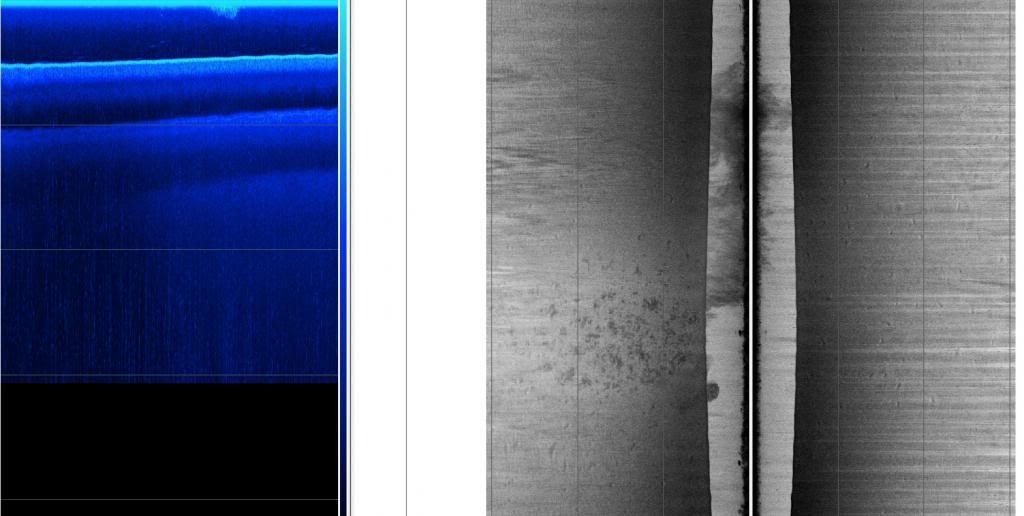
testing my unit out in this pic, it looks like a weed bed and bait ball on the left and beds on the right and prop wash in the center?
 Crappie.com 2016 Man of the Year
* Member Sponsor
Crappie.com 2016 Man of the Year
* Member Sponsor
Interesting...
Which viewer are you using for these shots...??
Rickie
www.podunkideas.com <--Click here
------------—————
https://www.crappie-gills-n-more.com/
https://cornfieldfishinggear.com/
------------------------>> Pro Staff Sonar Advisor
Slabmaster
Crappie.com 2016 Man of the Year
* Member Sponsor
Have you found the tools in Humviewer by right clicking on any of the image panes..??
In a DI image or 2d image in Humviewer...I generally set the "Crop to" setting to the next depth deeper than the actual water depth...this will show more of the water column above the bottom detail in a DI image or SI image...
I think you may be correct about the propwash and weeds in the SI image...
Do you have any screenshots from the unit itself of this same area...??
It is possible to playback that same recording in the HB unit and take snapshots of any point in the recording...
You can even freeze the playback in the HB unit (with the 4way cursor) and open a zoom window on those interesting sections of the display...and then take the snapshot...
Rickie
www.podunkideas.com <--Click here
------------—————
https://www.crappie-gills-n-more.com/
https://cornfieldfishinggear.com/
------------------------>> Pro Staff Sonar Advisor
Slabmaster
yeah I can I have not deleted anything yet off the card although I need to format it to the unit so I can get hum pc for waypoints
Slabmaster
Slabmaster
 Crappie.com 1K Star General
thx for the shots muddpuppy. Can't wait to get some shots of gill beds this spring. Went over to the bream forum a while back to see if anyone had some deep water shots of gills they were taking but never got a response...guess they never had any.
thx again
Posting Permissions

















