Likes Likes:  0
Thanks Thanks:  0
HaHa HaHa:  0
Page 1 of 2 12 LastLast
Results 1 to 10 of 18

Thread: Need Help with settings 998 hd si to see crappie not in water column

Hybrid View

Previous Post Previous Post   Next Post Next Post
  1. #1
    Join Date
    Oct 2013
    Location
    Illinois
    Posts
    169
    Post Thanks / Like

    Default Need Help with settings 998 hd si to see crappie not in water column

    I bought a 998 hd si last fall and have been pretty impressed with it overall. I'm getting good clarity on images. I drove over some Bill Dance fish attractors and could see them very well... And when I see a school of crappie in the water column they really show up good.... but disappear when the water column meets the lake bottom. I was hoping for some help in screen color and settings to use. I'm in almost clear water right now. They show up perfectly in the water column but I can't make them out after the water meets the lake bottom.

  2. #2
    rnvinc's Avatar
    rnvinc is offline Crappie.com 2016 Man of the Year * Member Sponsor
    Join Date
    Sep 2008
    Location
    West Ky
    Posts
    13,291
    Post Thanks / Like

    Default

    Try Inverse...and shorten the SI Range to about 60-70ft...

    Post some images so we can see what you're seeing...(or not seeing)...

    Rickie
    www.podunkideas.com <--Click here
    ------------—————
    https://www.crappie-gills-n-more.com/
    https://cornfieldfishinggear.com/

    ------------------------>> Pro Staff Sonar Advisor

  3. #3
    Join Date
    Oct 2013
    Location
    Illinois
    Posts
    169
    Post Thanks / Like

    Default

    O.K. I'll try inverse. It will be next weekend before I get out again. And I haven't been on here long so I don't know how to post pictures yet....if someone could explain how to post pictures I'll post some of my screen next week.

  4. #4
    Join Date
    Dec 2004
    Location
    W. Ky
    Posts
    529
    Post Thanks / Like

    Default

    Quote Originally Posted by jimmyfreeland View Post
    O.K. I'll try inverse. It will be next weekend before I get out again. And I haven't been on here long so I don't know how to post pictures yet....if someone could explain how to post pictures I'll post some of my screen next week.
    http://www.crappie.com/crappie/showt...-post-pictures
    Trump is like the guy that comes on the playground and beats up on the guys that's been pushing you around for the last 30 or 40 years.

  5. #5
    Join Date
    Nov 2004
    Location
    Adamsville Tn
    Posts
    4,608
    Post Thanks / Like

    Default

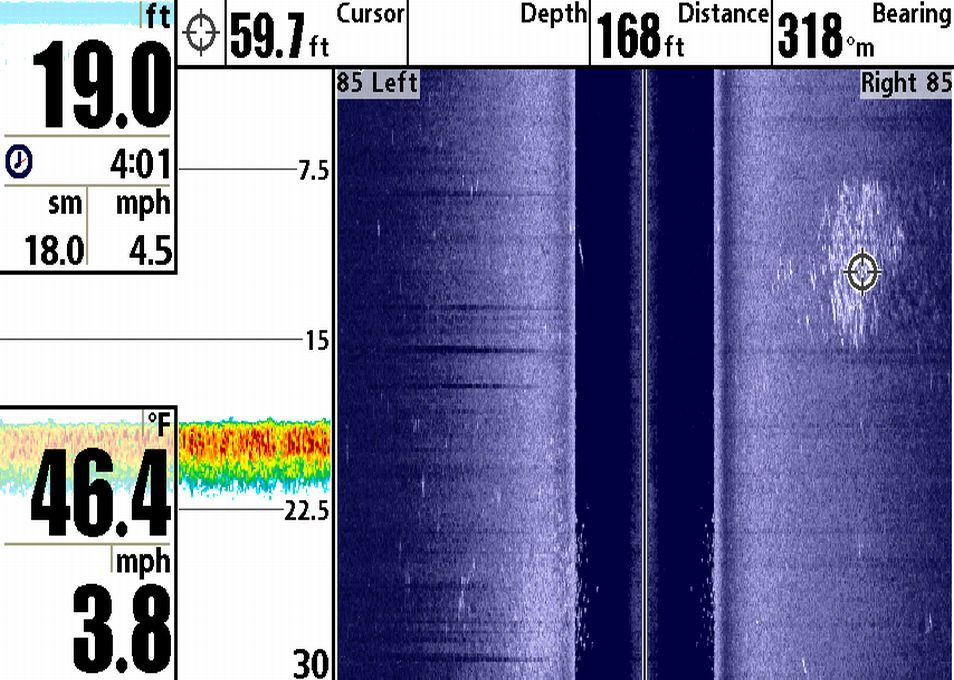
    Is this what your looking for?
    [/URL]
    Big School of crappie to the right. Did have the same bunch of fish with, but had the settings at 120 ft and could not tell they were that many fish in there. I run as narrow as I can, as if your running 150 ft or so. Your not finding the fish on bottom. I like it 75ft or less.
    Plus can see the fish at the bottom of the screen on bottom and in the water.
    Pete
    Last edited by ShilohRed; 02-20-2014 at 07:10 AM.

  6. #6
    Join Date
    Oct 2013
    Location
    Illinois
    Posts
    169
    Post Thanks / Like

    Default

    Yes that's what I'm looking to see, Maybe I need to change color, I was in one of the bright Amber or Brown looking colors. All I can see is the crappie like in the water column on yours. I was only 70ft. Might help if I turn my chart speed up a bit too I was on 1 since I was moving slow with the trolling motor. I know they are there the other boats (guide) was following with his and we were catching them when I saw some in the water column.. But we were next to him and he'd say there is a big school there and I would see nothing.... I set mine the same as his the only thing different could have been chart speed and screen color.

  7. #7
    Join Date
    Nov 2010
    Location
    Bland, Missouri
    Posts
    325
    Post Thanks / Like

    Default

    The side imaging enhance feature will make fish stand out better also. It makes the rest of the image appear grainy, but the white streaks that are fish will stand out better. Use it when looking for fish and turn it off when you want better bottom and cover clarity.

  8. #8
    Join Date
    Dec 2004
    Location
    W. Ky
    Posts
    529
    Post Thanks / Like

    Default

    Quote Originally Posted by st041986 View Post
    The side imaging enhance feature will make fish stand out better also. It makes the rest of the image appear grainy, but the white streaks that are fish will stand out better. Use it when looking for fish and turn it off when you want better bottom and cover clarity.
    I think that is the contrast. Turn from "off" to "low"
    Trump is like the guy that comes on the playground and beats up on the guys that's been pushing you around for the last 30 or 40 years.

  9. #9
    rnvinc's Avatar
    rnvinc is offline Crappie.com 2016 Man of the Year * Member Sponsor
    Join Date
    Sep 2008
    Location
    West Ky
    Posts
    13,291
    Post Thanks / Like

    Default

    Quote Originally Posted by ricky View Post
    I think that is the contrast. Turn from "off" to "low"
    Sometimes Sharpness higher will work for this also...

    Rickie
    www.podunkideas.com <--Click here
    ------------—————
    https://www.crappie-gills-n-more.com/
    https://cornfieldfishinggear.com/

    ------------------------>> Pro Staff Sonar Advisor

  10. #10
    Join Date
    Oct 2013
    Location
    Illinois
    Posts
    169
    Post Thanks / Like

    Default

    Yep tried that too, thinking it was the color of the screen that was making them blend into the lake bottom.

Page 1 of 2 12 LastLast

Posting Permissions

  • You may not post new threads
  • You may not post replies
  • You may not post attachments
  • You may not edit your posts
  •  

BACK TO TOP