
Likes Likes:  0
Thanks Thanks:  0
HaHa HaHa:  0
Results 1 to 9 of 9

Thread: Questions from GPS illiterate person

  1. #1
    Join Date
    Jul 2004
    Posts
    7,240
    Post Thanks / Like

    Default Questions from GPS illiterate person


    I think we need a page just for silly questions like I usually ask. I am wanting to know how you know how to get back to waypoints that are not saved on a lakemap of a particular lake. I want to drop some brush or bamboo in different areas around where I live. I was wondering if I can name those waypoints and pull them up on the unit by name. Say like I fish mud creek and have several there, could I name them like MC1 and MC2 and then if I fish Crow Creek name them like CC1 and CC2 and then when I am fishing whatever part of the lake can I pull those up by name and be able to locate that brush I marked.

  2. #2
    Join Date
    Jan 2007
    Location
    batavia twp, ohio
    Posts
    4,482
    Post Thanks / Like

    Default

    I'm not sure exacly what you're asking but I hope this helps. You don't say what kind of GPS you are using.
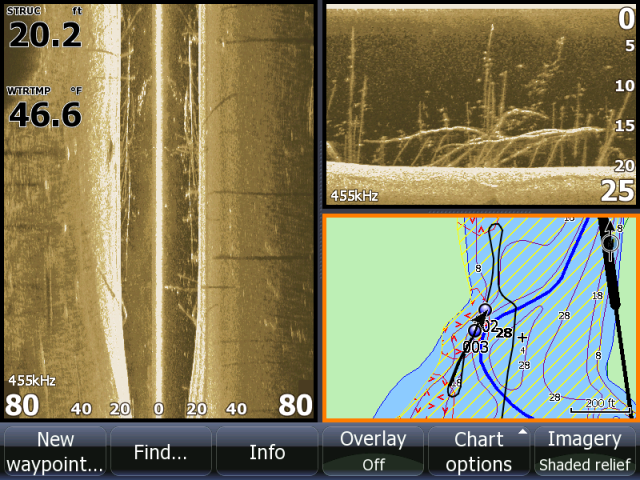
    Once you save a way point, it will show back up on a map (chart) See below 2 spots are marked #2 & #3. I marked each end of the tree. No need to name the waypoints if you don't want to.


    However if you are marking spots with a handheld unit (such as an e-trex) you wouldn't have a map to reference to.
    I have waypoints marked in both types of units. For the hand held, I just use the next available number to mark a waypoint but I do keep a small note book or log book with my waypoints sorted and some notes about each spot if needed. e.g. #37- brush pile on point 12 fow or #13- stump field on flat 13 fow
    Most units do have the abilitly to store data (names) if thats what you really want to do..
  3. #3
    Join Date
    Jul 2004
    Posts
    7,240
    Post Thanks / Like

    Default

    I guess what I am asking is this, I plan on buying something like a HB998 SI and want to be able to get back to waypoints by name or some way of knowing exactly where that numbered waypoint is. I fish tributaries I guess you would call them off the Tennessee river. Most of it is considered part of the Guntersville system even though it is not really Guntersville. There are several different launches and all the areas have different names. Names like, North Sauty, South Sauty, Mink Creek, Bellefonte, Mud Creek, Crow creek. If they waypoints just have numbers alone how would I know which area that number was in? Lets say I wanted to fish some brush I had at North Sauty, how would I know which waypoints are in North Sauty without having them named with something like the initials and then the number. Or will the GPS recognize the nearest waypoint locations based on the GPS coordinates where the boat is sitting and show me the closest ones to where I am fishing based on satelite return to where I am fishing at the time. Does the system automatically have a lake map of those areas or would I even have to have a lake map.

  4. #4
    Corker's Avatar
    Corker is offline Crappie.com 1K Star General - Sponsor
    Join Date
    Mar 2008
    Location
    Toano, VA
    Posts
    5,133
    Post Thanks / Like

    Default

    The HB998SI manual is here. Page 50 explains the procedure for marking a waypoint and then editing the name. I don't know what kind of map HB loads in these units, but the map loaded in my HB1197 provides plenty of detail.

  5. #5
    Join Date
    Jan 2007
    Location
    batavia twp, ohio
    Posts
    4,482
    Post Thanks / Like

    Default

    I see what you're saying. I kind of used to feel like that too before I bought my HDS units. The answer to your question is yes you will be able to mark them and name them.
    Once I started marking spots I just couldn't see an advantge to actually changing the assigned number to another designation. If the 2 spots above were in Mudd Creek, would it matter if I changed them to MC1 & MC2. If you are looking at Mudd Creek on your chart (map) all & only the spots in Mudd Creek are going to show up.

  6. #6
    Join Date
    May 2007
    Location
    Eufaula, AL.
    Posts
    2,186
    Post Thanks / Like

    Default

    And the 998c HD Si unit can display a list of the nearest waypoints as well. You can even do this in the simulator mode with your boat on the trailer.

    You can name the waypoints while on the water or write down a note for each as you make it and make all the name changes later that day/night on your computer using the HumminbirdPC software. You can even view these same waypoints in Google Earth form the HumminbirdPC program.
    Greg Walters at Humminbird
    [email protected]
    I help because I can

  7. #7
    Join Date
    Apr 2007
    Location
    Bloomfield, Missouri, United States
    Posts
    1,619
    Post Thanks / Like

    Default Questions from GPS illiterate person

    The map on your unit will show your boat icon on the map at your current position. You can zoom the map in or out. You go out far enough, it will show every waypoint on the lake. Very handy. You can zoom in as you get closer to your point and be lot more accurate in getting over it. Or do a "go-to" and it will show a distance/direction to your point. Good stuff.

  8. #8
    rnvinc's Avatar
    rnvinc is offline Crappie.com 2016 Man of the Year * Member Sponsor
    Join Date
    Sep 2008
    Location
    West Ky
    Posts
    13,291
    Post Thanks / Like

    Default

    Quote Originally Posted by talltimber View Post
    The map on your unit will show your boat icon on the map at your current position. You can zoom the map in or out. You go out far enough, it will show every waypoint on the lake. Very handy. You can zoom in as you get closer to your point and be lot more accurate in getting over it. Or do a "go-to" and it will show a distance/direction to your point. Good stuff.
    This might be a good opportunity to explain how waypoints are saved into the HB unit internal memory.....

    If the unit is zoomed all the way out...the entire United States (and some additional area) is visible on the Contour XD base map...(see below depiction)

    Waypoints are saved onto this Contour XD base map in the internal memory of the unit...

    Any mapping card data (Navionics/Lakemaster) is "overlayed" as a transparent layer over the base map...(waypoints from the base map will "show thru" (sortof) the transparent layer of the card's mapping data)

    Waypoints can be marked at any spot on the unit's base map...

    The GPS satillites pinpoint your unit's antenna location anywhere on this base map and then the unit displays the "boat icon" on the base map at the antenna's present location...

    Any marked waypoints within the user selected "Zoom Range" of the unit will show in proximity of the boat icon's position on the chart...(zoom in (+) to show only waypoints close to the boat icon's position on the chart.... zoom out (-) to show waypoints farther away from the boat icon's position on the chart)

    What this means is...

    *Fishing in California...?? ...waypoints marked will be saved on the base map in California...
    *Fishing in Virginia......?? ...waypoints marked will be saved on the base map in Virginia....

    The next time the unit is in California....the GPS satillites will pinpoint the unit antenna at the correct position on the base map in California....then the unit can display the "boat icon" at that location and any "saved marked waypoints" on the unit's base map within the user selected "Zoom Range" of the unit will be shown...

    Clear as mud...??

    Rickie
    Attached Images Attached Images  
    Last edited by rnvinc; 02-05-2013 at 10:51 AM.
    www.podunkideas.com <--Click here
    ------------—————
    https://www.crappie-gills-n-more.com/
    https://cornfieldfishinggear.com/

    ------------------------>> Pro Staff Sonar Advisor

  9. #9
    Join Date
    Jan 2006
    Location
    Lakewood Club, Michigan.
    Posts
    1,392
    Post Thanks / Like

    Default

    Great job Rickie.

    You nailed it.
    Mike

Posting Permissions

  • You may not post new threads
  • You may not post replies
  • You may not post attachments
  • You may not edit your posts
  •  

BACK TO TOP













